Field operations for property management
Know where the work is, who is doing it, and that it got done
MyEstateGrid puts your crews, your buildings, your work orders and your owners in one place — with GPS-verified time, photo proof, and a portal for everybody who keeps asking you for an update.Free trial. No card, no sales call, no setup fee.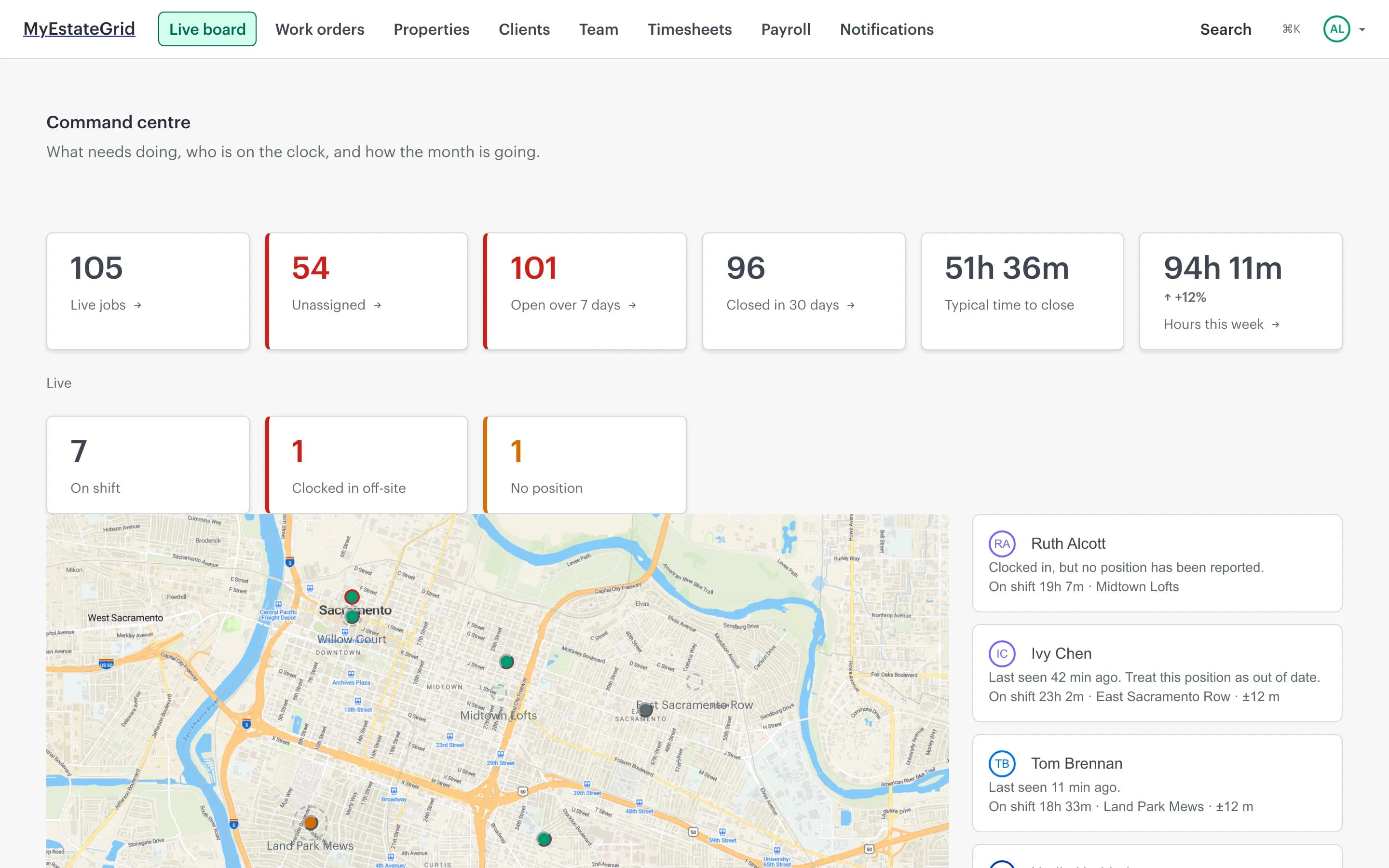
The week you are having
Most of this job is finding out what already happened
Not because anyone is doing it badly, but because the record of it is spread across paper, phones, texts and a spreadsheet.
- Timesheets arrive on paper, a week late, and nobody can say whether the hours are real.
- Somebody rings to ask where a technician is, and the honest answer is that you will find out and call back.
- The photo that proves the job was finished is on a phone belonging to someone who left in March.
- An owner wants to know what has been spent on their building, and answering means opening a spreadsheet.
- A resident reports a leak by text message, at eleven at night, to whoever they happen to have a number for.
- Payroll is a morning of retyping, and the mistakes are only found after people are paid.
What it does
One system for the work, the people doing it, and the proof it was done
Everything below is in the product today. Nothing on this page is a roadmap item.
Time and attendance, with a location attached
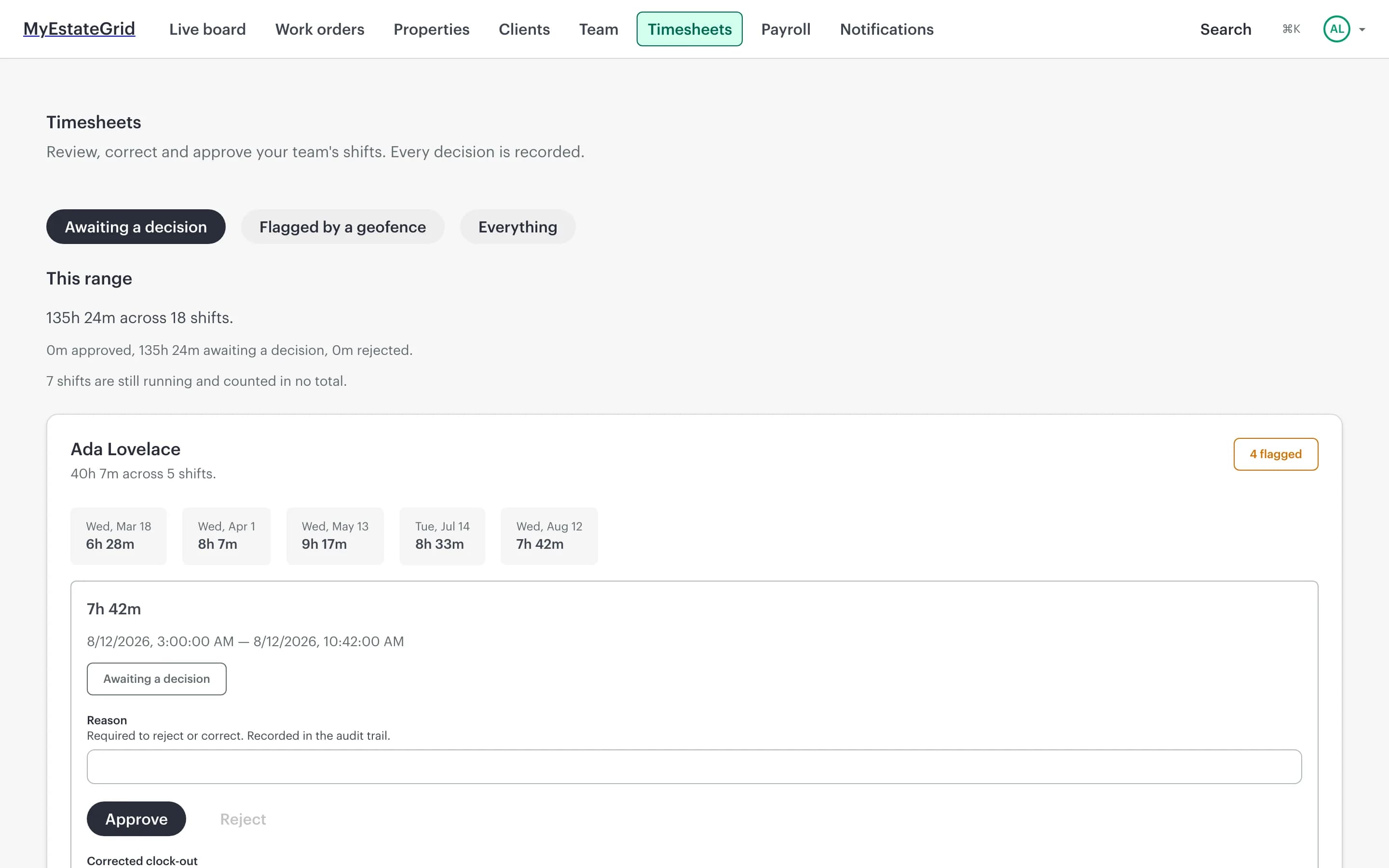
Crews clock in and out from their phone. Every punch carries a GPS fix, so a shift started off-site is flagged for review instead of discovered at payroll. Corrections are allowed, recorded, and attributed.A live board of who is on shift
Everybody currently clocked in, on a map, updating in real time — and, beside it, the people the map cannot place, which is the list you actually need when somebody is not where they should be.Work orders that close with proof
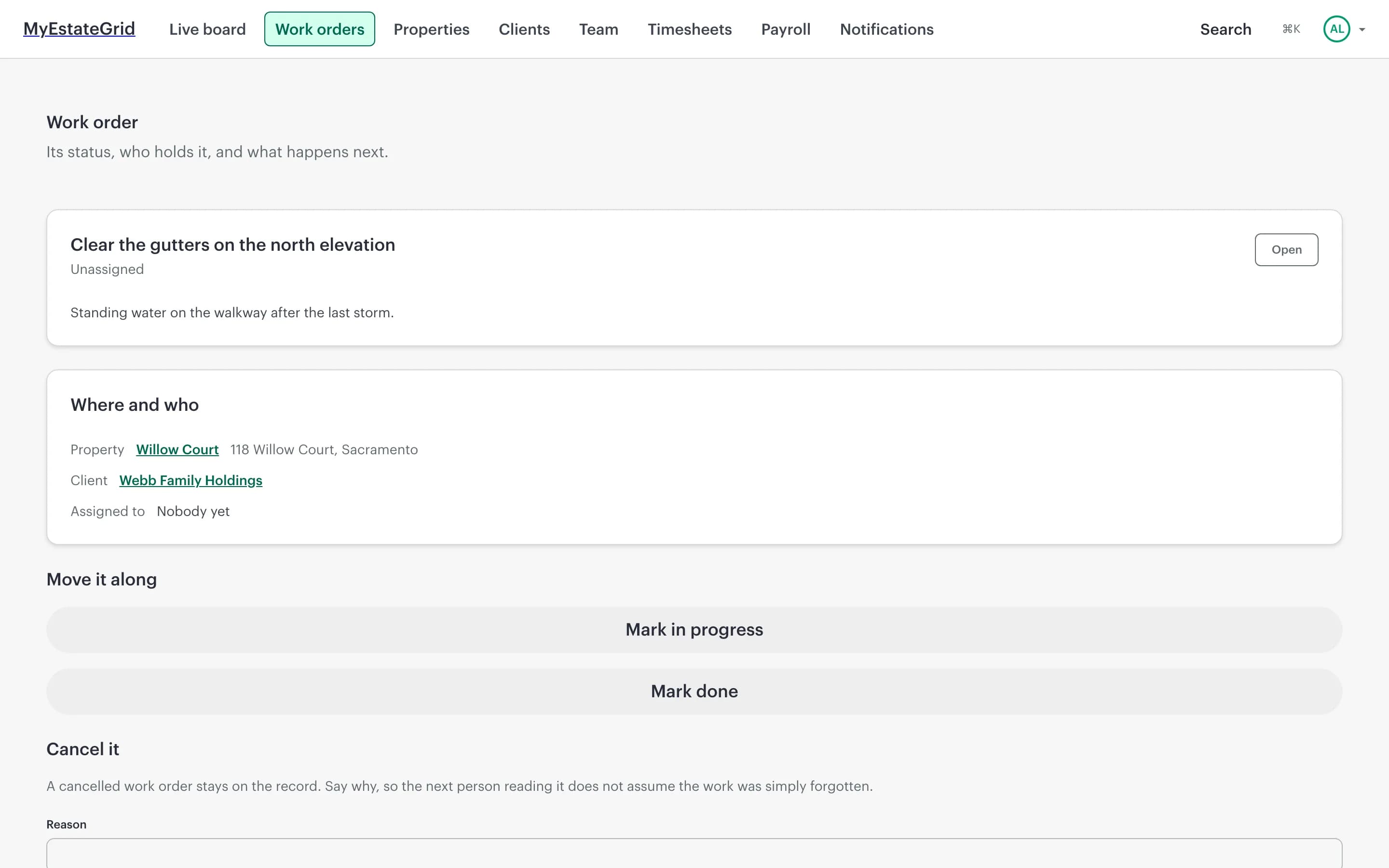
Raise a job against a building or a specific unit, assign it, and track it through a lifecycle the server enforces. Job types can require photos, so "done" means there is something to look at.The whole portfolio, searchable
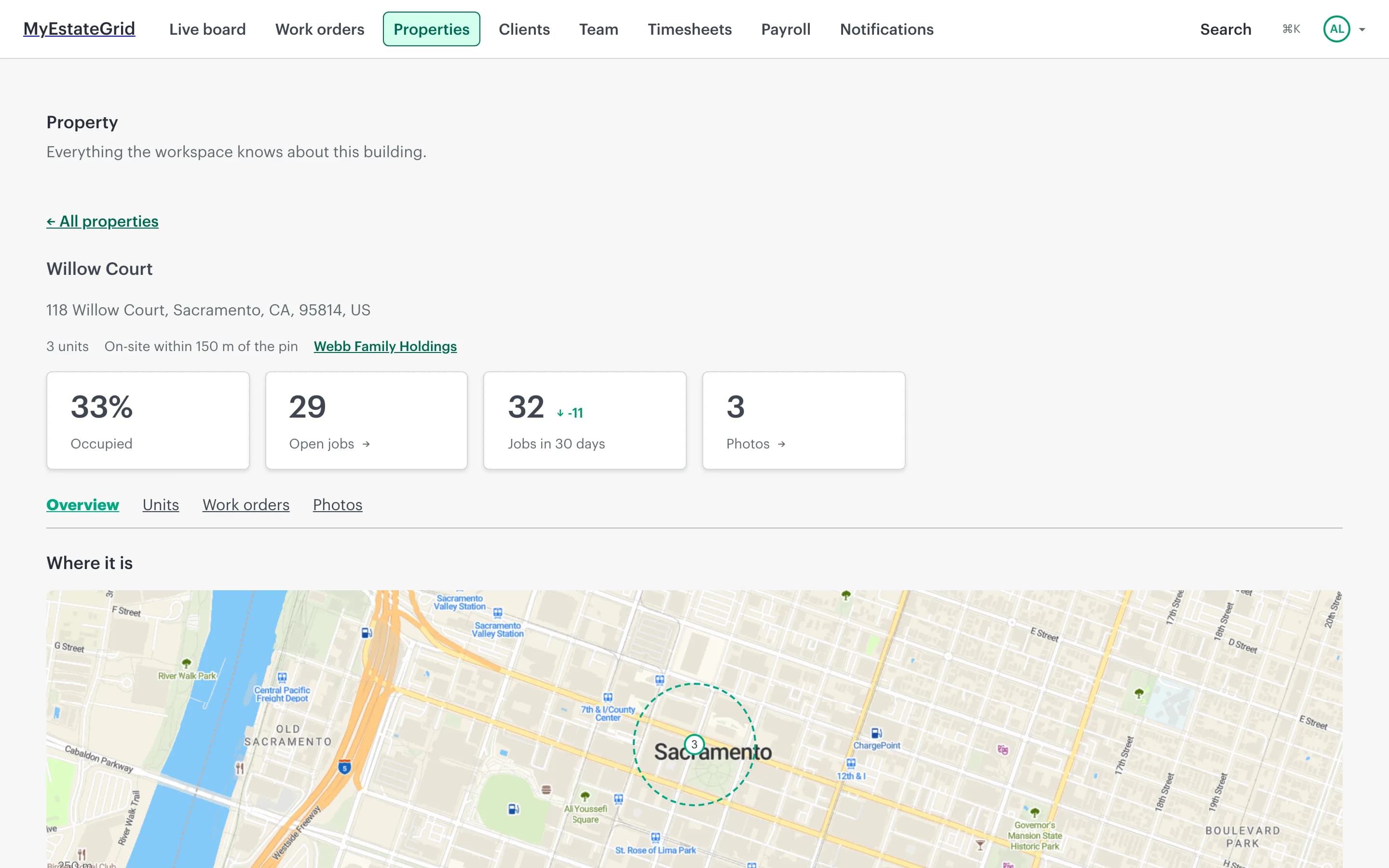
Buildings and their units, each with an address, a geofence and an owner. Retired buildings are archived rather than deleted, so last year’s work orders still make sense.An owner portal that answers the questions for you
Owners sign in and see their own buildings and their own jobs — and nothing else. The status call becomes a page they can open themselves.Residents report problems where you can see them
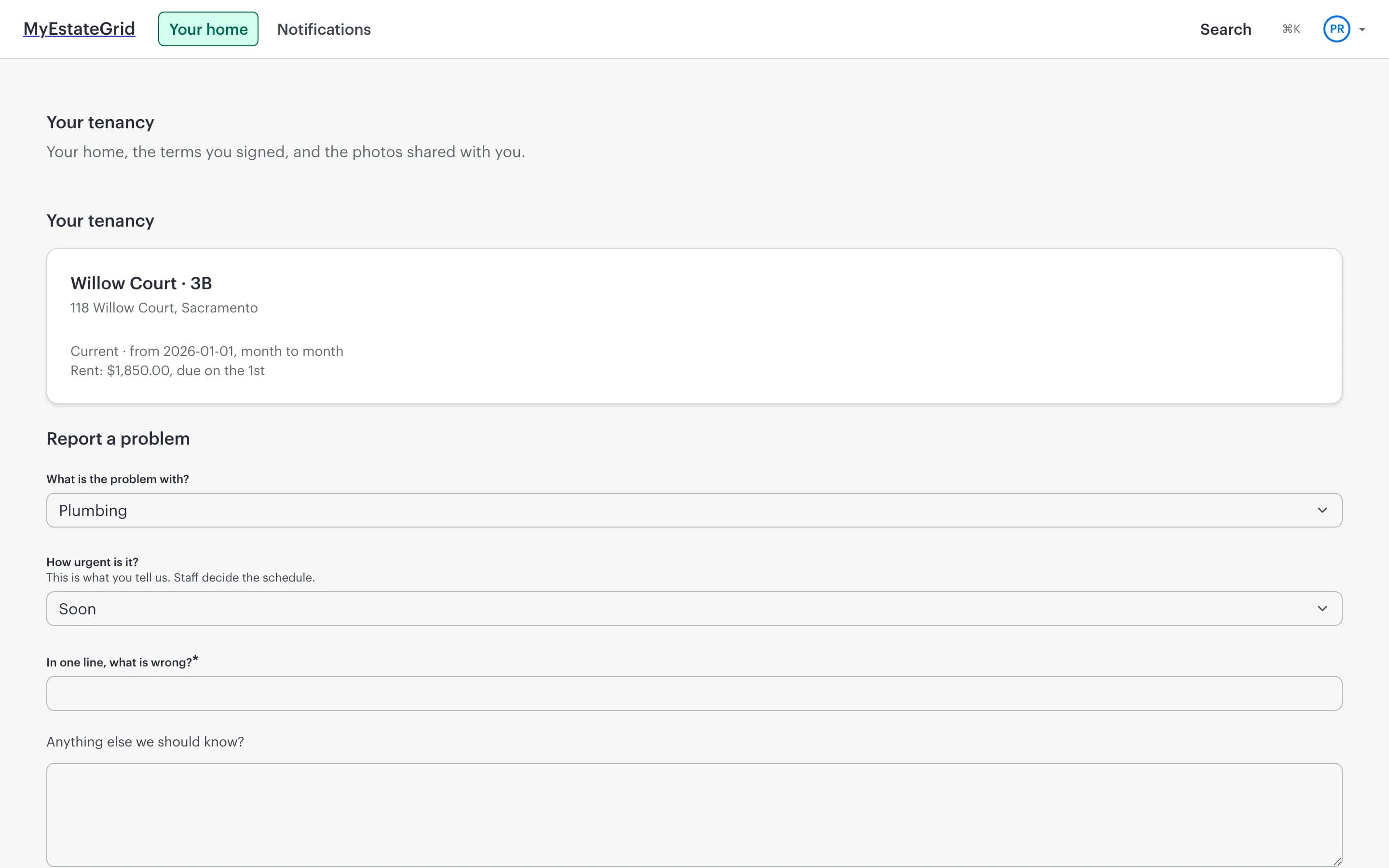
A renter reports a fault from their phone, with photos and an urgency. It lands as a work order against their unit automatically, and what they actually said survives triage.Payroll without the retyping
Approved timesheets, overtime rules applied to them, exported for a payroll run — with the flagged punches dealt with before the export rather than after the payment.Works with no signal
Installs to the home screen and keeps working in a basement or a lift. Punches and updates queue on the device and send themselves when the signal comes back, without duplicating anything.What it looks like
This is the product, not a mock-up
Every screen below is a capture of the running application against demonstration data. Nothing here is a design that has not been built.
The morning viewLive jobs, what is unassigned, what has been open too long, and who is on the clock right now — with the geofence drawn around the building they are standing in.
Hours you can checkEvery shift arrives with the punch that made it. A clock-in from outside the geofence is flagged for a decision, not silently accepted or silently refused.
The job, end to endWhat was asked for, which building and which client it belongs to, who holds it, and the only moves it can legally make from where it stands.
Every building, and what happens at itThe address, the units, the geofence drawn to scale, and tabs for the jobs, the photos and the history of the record itself.
The people who keep askingOwners see their buildings and the work done on them. Residents see their tenancy and report a problem themselves — which arrives as a work order, not an email.
Who signs in
Four different people, four different views, one set of facts
Everybody involved gets the part that concerns them — and only that part.
The manager
Admin or managerThe live board, the work order queue, timesheet review, the portfolio, and the people.The field crew
EmployeeClock in, the jobs assigned to them, and a camera. Nothing else, on purpose.The owner
Client portalTheir buildings, their work orders, their documents. Scoped to what they own.The resident
Renter portalTheir lease, their unit, and a way to report a problem that reaches somebody.Getting started
Running by the end of the day, not the end of the quarter
Create your workspace
Pick a name and you get your own address, with your own data behind it. Minutes, not an implementation project.Add buildings and invite your crew
Guided setup walks you through the first building, the first geofence and the first invitations. Add your logo and colours while you are there.Start the week
Crews clock in from their phones, jobs get raised and assigned, and by Friday the timesheet is already reviewed instead of arriving on paper.How it is built
The questions your IT person will ask
Answered here rather than in a security questionnaire six weeks in.
API-first, and the API is public
Every screen in the product is built on the same documented REST API, published as OpenAPI 3.1 with a browsable Swagger UI. Issue yourself a key and automate anything the interface can do.Your data is only ever yours
Each workspace has its own subdomain and its own isolation, enforced in the data layer rather than remembered by each query. A caller cannot name someone else’s workspace.Location tracking with consent, and an end date
Staff see and accept a versioned disclosure before anything is captured. Positions are recorded only while clocked in, and they expire after 72 hours.People see what their job needs
Permissions are data, not hardcoded role checks, so a role can be shaped to how your company actually works — and no one can grant themselves more than they hold.Pricing
Priced on the size of the operation, not on the number of features
Every plan has every capability on this page. What changes is how many people, how many buildings, and how many photos.
TrialFreeEnough of the product to run a real week of work, not a sandbox. Small enough that nobody builds a business on it by accident.
People: up to 5
Properties: up to 5
Photo storage: 1 GB
Starter$49/monthOne crew and a portfolio a single manager can hold in their head.
People: up to 15
Properties: up to 50
Photo storage: 25 GB
Professional$199/monthSeveral crews, dispatch, and a portfolio that needs searching.
People: up to 75
Properties: up to 500
Photo storage: 250 GB
EnterpriseTalk to usNegotiated ceilings, which in practice means none of the ones above.
People: unlimited
Properties: unlimited
Photo storage: unlimited
Questions
The things people ask before they start
Do my crews need new phones?
No. It runs in the browser on whatever they already carry, installs to the home screen like an app, and is built to work on a bad connection rather than to assume a good one.
Is tracking my staff legal?
Where it is done properly, yes — and doing it properly is built in rather than left to you. Staff are shown a disclosure and must accept it, location is captured only while they are clocked in, never off shift, and those positions are deleted after 72 hours.
Can I get my data out again?
Yes, through the same public API the product itself uses — not an export request and a wait. Payroll runs also export to file, and exports keep working even on a workspace that has gone read-only, because reading your own data is not a paid feature.
What happens when the trial ends?
Nothing is deleted and nothing is charged. The workspace becomes read-only until you pick a plan, so the decision is yours to make rather than forced by losing access.
How long does setup take?
A workspace exists the moment you sign up. Guided setup covers the first building and the first invitations, and most companies are clocking real shifts the same day.
Can it look like my company rather than like yours?
Yes. Upload your logo and set your colours, and that is what your staff, your owners and your residents see when they sign in.
Run next week on MyEstateGrid
A workspace takes a couple of minutes to create, and it is free to try with your own buildings and your own crew.